Datadog
By default, Nullstone configures your applications to use the log service in your cloud provider. Instead, some teams prefer to use third-party telemetry providers for logs and metrics. This guide shows how to configure Datadog for an application's logs and metrics.
Create Datastore
To integrate with Datadog, create a datastore in Nullstone using the Datadog module.
Launch Datastore
To launch the Datadog datastore, you need to configure the datastore with an API Key and App Key that has acccess to your Datadog instance.
API Key
Visit https://app.datadoghq.com/account/settings#api.
Open API Keys section and Create API Key. 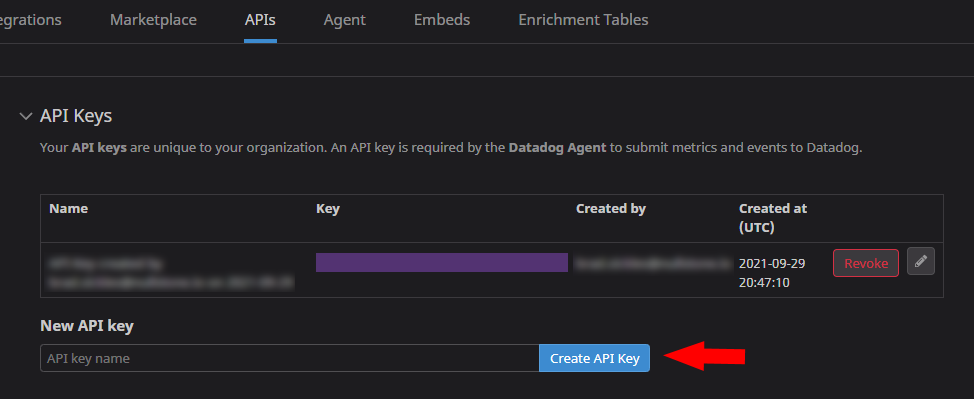
App Key
Visit https://app.datadoghq.com/access/application-keys.
Click New Key. Name the key Nullstone. 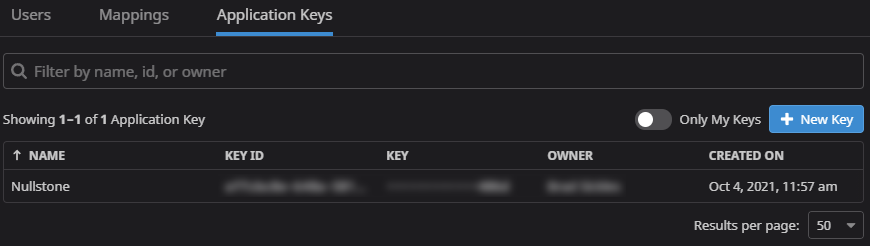
Configure Datastore
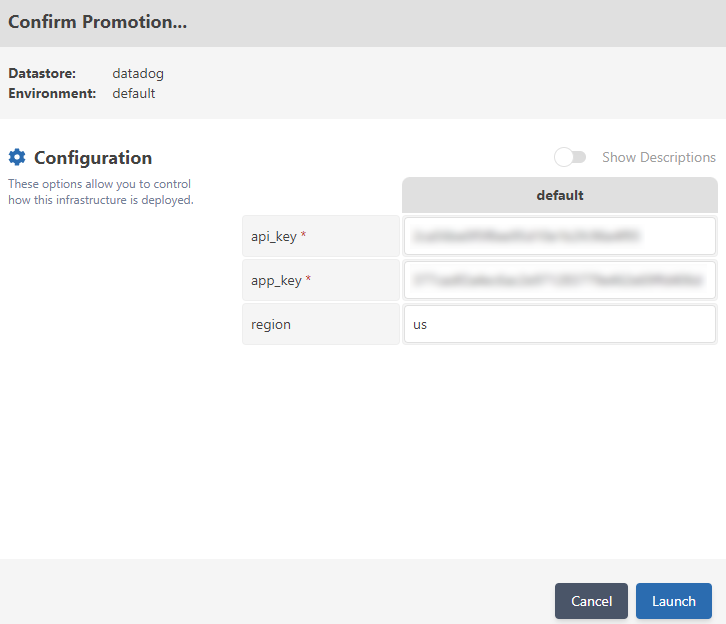
Launch your datastore from the Nullstone UI. Enter your newly-minted API Key and App Key.
Send application logs to Datadog
With the Datadog datastore configured, you can attach the datastore to applications to relay logs to Datadog.
Open an application in Nullstone. Navigate to the Datastores tab, click + Datstore Connection. Select the Datadog datastore.
Click Launch/Update on your application to apply the changes.
Once complete, new application logs will appear in your datadog within 5 minutes.
logs CLI command
You may still continue to view logs using the nullstone logs CLI command.
> nullstone logs -t -s '5m' -app=<app-name> --env=<env-name>Datadog tags
The Datadog capability will automatically tag your application logs/metrics in Datadog.
service- Nullstone Appenv- Nullstone Environmentstack- Nullstone Stack@block- Nullstone App